Instructions for Side by Side Printing
- Print the notecards
- Fold each page in half along the solid vertical line
- Cut out the notecards by cutting along each horizontal dotted line
- Optional: Glue, tape or staple the ends of each notecard together
AS Statistics 1
front 1 Types of graphs and date | back 1 categorical, ranked, discrete numerical (countable), continuous numerical (range). Box plot shows minimum, the quartiles, median and maximum. Frequency polygon is a regular line graph. Cumulative frequency curve. Histogram is bar chart for continuous data. |
front 2 How to calculate a specific percentile | back 2 Percentile wanted x total frequency / 100 averages are referred to measures of central tendency. |
front 3 Standard deviation and outliers | back 3 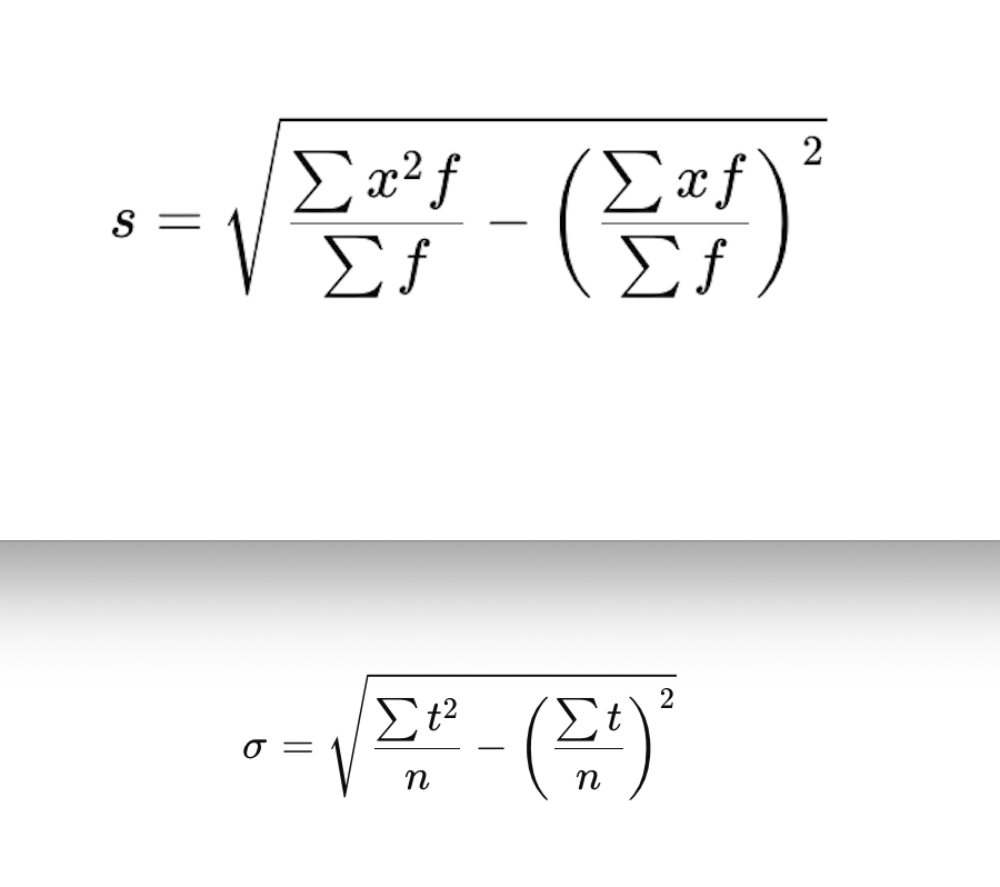 Standard deviation - deviation is value - mean. Square the deviations and then find the means of them for the range of values. Then square root. Outliers are 1.5 x the interquartile range. either lower the lower quartile or over upper quartile. or 2 standard deviations away from the mean. |
front 4 working with histograms | back 4 Frequency = frequency density × class width Mean = frequency x midpoint / frequency |