Instructions for Side by Side Printing
- Print the notecards
- Fold each page in half along the solid vertical line
- Cut out the notecards by cutting along each horizontal dotted line
- Optional: Glue, tape or staple the ends of each notecard together
110
front 1 When should Dither be applied? a: when going from a higher sample rate to a higher sample rate b: when going from a higher sample rate to a lower sample rate c: when going from a lower sample rate to a higher sample rate | back 1 c: when going from a lower sample rate to a higher sample rate |
front 2 Track width (for the Mix window) can be changed from the ___ menu. a: option b: view c: edit | back 2 b: view |
front 3 Which of the following statements about Elastic Audio is TRUE? a: rendered processing mode is more demanding on CPU resources than real-time processing mode b: rendered processing mode is less demanding on CPU resources than real-time processing mode c: rendered processing mode is not demanding on CPU resources with real-time processing mode | back 3 b: rendered processing mode is less demanding on CPU resources than real-time processing mode |
front 4 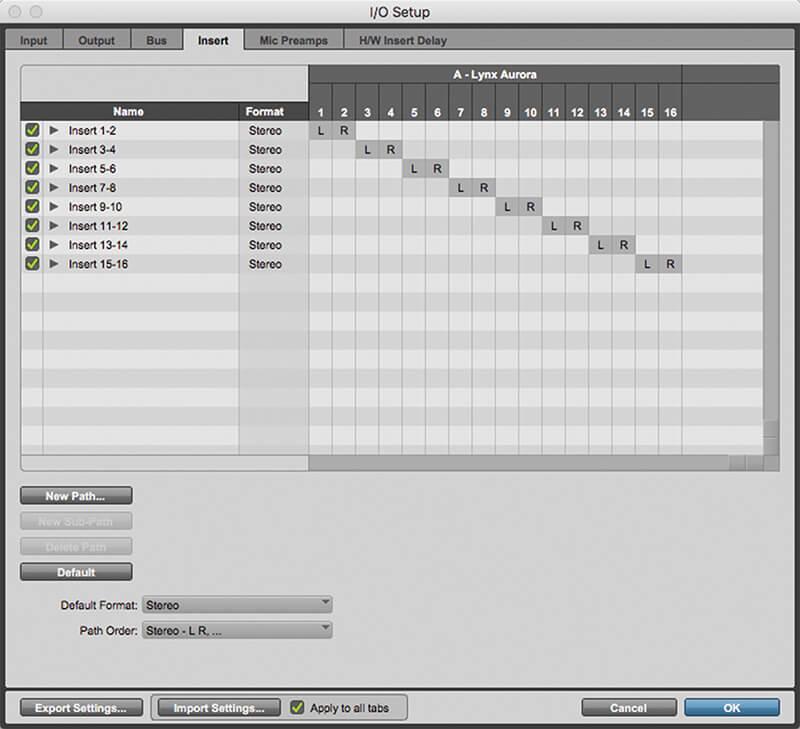 Refer to the image. The view shown in the column labeled "???' in the screenshot is called | back 4 the I/O view |
front 5 Master Fader track types can be used to a: main mix b: sub mix c: headphones mixes d: submix and other routing applications e: all of the above | back 5 e: all of the above |
front 6 Changes made in the Real-Time Properties Floating Window may be applied to what elements of a Pro Tools session? a. MIDI TRACKS | back 6 e. A, B and C |
front 7 at is required in order to play video in Pro Tools? a: disabling the video engine b: enabling the audio engine c: enabling the video engine d: disabling the audio engine | back 7 c: enabling the video engine |
front 8 Which of the following are ways to delete Warp markers from clips that have Elastic Audio processing applied? a: Option-click/Alt-click on a Warp marker w/ grabber tool b: Double-click w/ grabber tool, d: Double-click w/ selector tool e: all of the above f: a,b,c | back 8 f: a,b,c |
front 9 Which of the following timescales is tick-based? | back 9 Bars|Beats |
front 10 Which of the following are ways to edit a fade after it has been applied? a: Double-click on the fade graphic with the Grabber tool to
re-open the Fades dialog box. c: both a and b | back 10 c: both a and b |
front 11 Which of the following modifiers can be used to add a new audio track to your session by double-clicking? a: Command b: Shift c: Option d: Control | back 11 a: Command |
front 12 True or false: a session's customized I/O settings can be saved on the Pro Tools system for use in later sessions | back 12 true |
front 13 Refer to the image sequence. To set the Pre-roll and Post-roll with the Selector tool (as shown in the screenshots), what modifier would you hold while clicking before/after the section a: shift b: option c: control d: command | back 13 b: Option |
front 14 The Rulers can be accessed from the ____ menu a: view b: command c: shift d: control | back 14 a: view |
front 15 A Clip Group can be created by first going to the ____ menu, and then choosing "Group" a: edit b: window c: clip d: option | back 15 c: clip |
front 16 The metronome click can be enabled (or disabled) from the ____ menu a: edit b: window c: clip d: option | back 16 d: option |
front 17 Based on the screenshot, what will be the effect when the "Apply" button is clicked? | back 17 The session tempo will gradually increase from 115 BPM at Bar 9 to 135 BPM at Bar 11 |
front 18 Which tool will be active when positioning the smart tool in the center of a clip in the top half of the track? a: selector tool b: grabber tool c: either a or b | back 18 a: selector tool |
front 19 Refer to the image sequence. To move the playback range to a new location while keeping the same length (as shown in the screenshots), what modifier would you hold while dragging a timeline in or Out point a: edit b: window c: clip d: option | back 19 d: option |
front 20 Refer to the image. What does the icon in the upper right corner of the clip indicate? | back 20 the clip has been warped with Elastic Audio |
front 21 Refer to the image. What would happen to the pictured MIDI clip if the session tempo were increased (keeping the default time base for the track)? a: midi clip would move earlier on the timeline b: midi clip would appear later on the timeline c: midi clip will appear shorter on the track d: all of the above e: a and c | back 21 e: a and c |
front 22 When using Elastic Audio, which of the following are ways to apply pitch transposition? | back 22 Select the Clip, go into Clip > Elastic Properties, and adjust the Pitch Shift settings at the bottom of the window |
front 23 Refer to the image. What kind of Elastic Audio markers are represented by the solid black lines with the triangles at their base in the screenshots? | back 23 warp markers |
front 24 Which of the following are ways to improve the quality of elastic audio processing? a: Delete unnecessary Event markers d: all of the above | back 24 d: all of the above |
front 25 Refer to the image. Which key can you hold to select the contiguous range of clips in the Clip List, as shown in the screenshot? a: control b: command c: option d: shift | back 25 b: command |
front 26 Refer to the image. the click/countoff dialog box (shown below) can be accessed from the | back 26 setup menu |
front 27 Which of the following is not a type of Time-Based Effect? | back 27 Expander |
front 28 <span>What is the tick value of 1/8th note?</span> | back 28 480 |
front 29 Refer to the image. Which of the following best describes the action illustrated in the screenshots? | back 29 a clip group is selected and ungrouped. |
front 30 Automation breakpoints can be edited in all of the following ways, except? | back 30 locked |
front 31 Pro Tools lets you automate the following controls in real time during playback a. Volume, mute and pan controls on Audio, Aux, MIDI and INST
tracks | back 31 e. All of the above |
front 32 Which track view lets you manually warp audio on elastic Audio-enabled track? | back 32 warp menu |
front 33 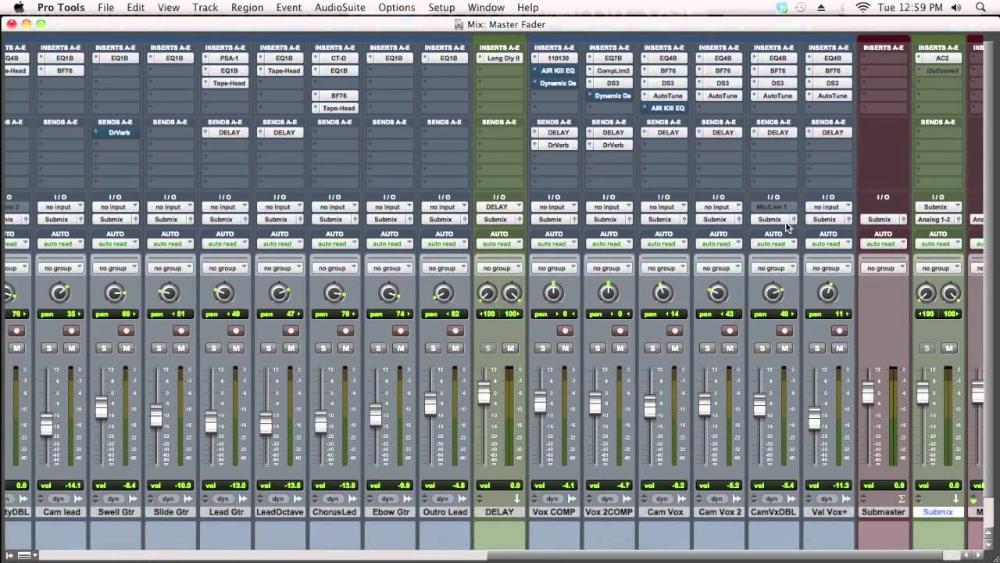 The following screen shot shows what type of track? | back 33 Master Fader track |
front 34 What is the default Thru Instrument setting used for in Pro Tools? a: allows you to specify a virtual instrument to use when auditioning mid clips b: when monitoring MIDI input from connected keyboard c: both a and b | back 34 c: both a and b |
front 35 Refer to the image. Which control would you use to enable tick-based timing on the Bass Track? | back 35 Track Timebase selector |
front 36 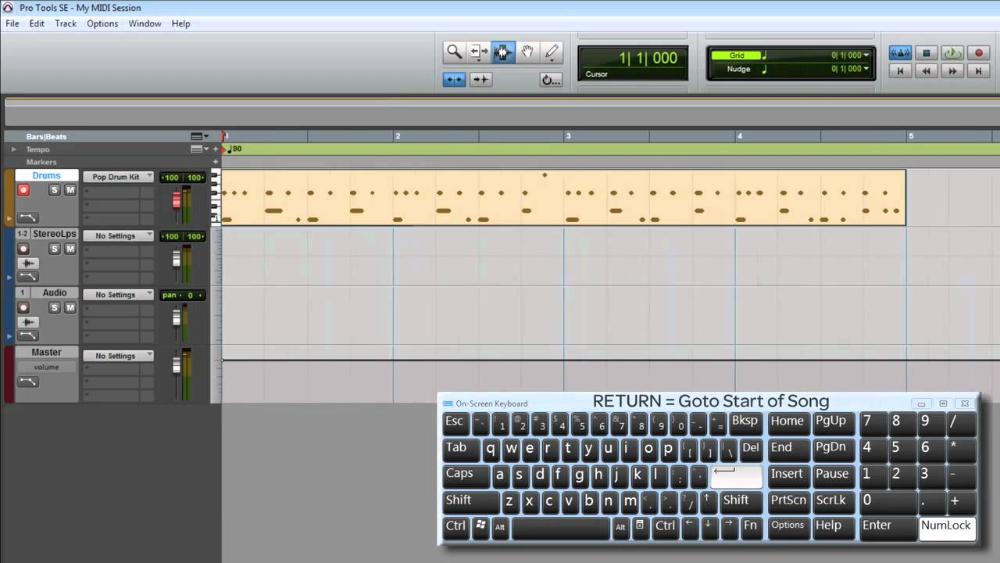 The following screen shot shows what type of track? | back 36 Instrument Track |
front 37 True or false the H/W Buffer Size setting determines the buffer size for tracks in the low-latency processing domain, such as record-enabled tracks | back 37 true |
front 38 Which modifier can you use to ADD an event to a ruler (such as a new Meter change, Tempo change, or Marker)? a: control b: command c: shift d: option | back 38 a: control |
front 39 Pre/Post Roll can be enabled (or disabled) from the _____ menu a: view b: windows c: option d: edit | back 39 c: option |
front 40 Refer to the image. Which control would you use to display velocity stalks for the MIDI drums track? | back 40 Track View Selector |
front 41 When selected "Overwrite Files" options in an AudioSuite plug-in's Processing Output Mode selector means that _______ | back 41 the parent file will be processed and permanently changed |
front 42 true or false Clicking on the lit "S" indicator at the top of the Edit window will un-solo any soloed tracks in the session | back 42 true |
front 43 Which of the following is TRUE about track groups | back 43 groups can be modified to change their membership at any time |
front 44 which dialog box allows you to set the clock source for your currently connected audio interface | back 44 hardware setup dialog box |
front 45 the workspace browser can be opened from the _____ menu a: option b: edit c: window d: shuffle | back 45 c: window |
front 46 which of the following import options are available under the file menu in pro tools? a. Import > Audio | back 46 d: a, b, and c |
front 47 Refer to the image sequence.The screenshots illustrate MIDI notes being selected and deleted. What track setting is required to preform this action? | back 47 Notes view |
front 48 the I/O setup dialog box can be opened from the ______ drop-down menu a: view b: edit c: setup | back 48 c: setup |
front 49 which of the following are ways to toggle the click on/off when using a click track? a. Click the Metronome button in the Transport window b. Choose Options > Click c. Press the [7] key on the numeric keypad d: all of the above | back 49 d: all of the above |
front 50 true or false once a clip group has been created, the clips cannot be ungrouped | back 50 false |
front 51 true or false the default color coding that Pro Tools applies to tracks is alphabetically by name | back 51 false |
front 52 Refer to the image. According to the screenshot, how many tracks are currently displayed in the session? | back 52 three |
front 53 Which key can you hold to select/deselect non-contiguous clips in the Clip List? a: control b: command c: option | back 53 b: command |
front 54 Which of the following is NOT true of inserts? | back 54 inserts are switchable between pre- and post-fader |
front 55 Which of the following can affect the Mix attributes that are linked for a track group? a: setting selected under the attributes tab b: under the globals tab c: status of the follow globals checkbox d: a and c e: a, b, and c | back 55 e: a, b, and c |
front 56 The Input Quantize window (shown below) can be accessed from the _____ menu a: options b: edit c: event | back 56 c: event |
front 57 The Real-time properties view in the Edit Window applies to which of the following? a: instrument tracks b: midi tracks c: all of the above | back 57 a: instrument tracks b: midi tracks c: all of the above |
front 58 Quantizing Elastic Audio events will do which of the following? a: Quantize selected material on both sample-based and tick-based
tracks d: all of the above | back 58 d: all of the above |
front 59 What is required in order to loop the displayed clips to create a repeating 4-bar pattern? | back 59 the clips must be combined into a clip group and then looped |
front 60 To display the Tempo or Meter ruler in a session without using the main menu, which control would you use? | back 60 Ruler View Selector |
front 61 Unlike inserts on Audio tracks and Aux Inputs, inserts on Master Fader tracks are always... | back 61 Post Fader |
front 62 Which Pro Tools Automation mode enables you to easily write automation on small sections of volume automation, returning to reading existing automation when you release the fader? a: write b: touch | back 62 b: touch |
front 63 true or False The Fade dialog box (shown below includes controls for auditioning and previewing fades before you apply them | back 63 true |
front 64 Refer to the image. What is indicated by the square cursor in the screenshot? | back 64 A crossfade is being created using the Smart Tool |
front 65 Which of the following are ways to navigate through MIDI notes on a track? | back 65 Press the TAB key and Press the LEFT/RIGHT ARROW keys |
front 66 How can you quickly adjust the timing of specific individual notes of an audio clip, leavings other unchanged? | back 66 Apply quantization with Elastic Audio |
front 67 Which of the following is true of Expanded view mode? | back 67 It provides access to send controls across all tracks |
front 68 How can automation be copied from one type and pasted to a different type (such as from a Volume graph to a Send Level graph)? | back 68 by using standard "Copy" and "Paste Special commands" |
front 69 TRUE or FALSE Elastic Audio pitch transposition can be removed at anytime without degrading audio quality | back 69 true |
front 70 When active the suspend button in the automation window does which of the following? | back 70 Suspends writing of automation on all tracks |
front 71 Which of the following are ways to delete MIDI notes? a: Select the note with the Grabber tool and press the Delete key b: Option-click on each note with the Pencil tool c: Double-click on each note with the Pencil tool d: all of the above | back 71 d: all of the above |
front 72 what is the difference between the "Input Quantize" function and the "Quantize" function | back 72 "Input Quantize" is applied during the record process; "Quantize" is applied to existing material on a track |
front 73 Based on the displayed Send window, which of the following is true? | back 73 The send is in Pre-Fader mode |
front 74 Which of the following are available drag-and drop destinations when importing audio files from a Workspace browser? a: the clip list b: An existing track c: The Track List d: b and c e: a, b, and c | back 74 e: a, b, and c |
front 75 A clip group is | back 75 a collection of audio, MIDI, or video clips that is grouped together to facilitate selection and manipulation |
front 76 true or false audio clips can only be quantized on tick-based tracks | back 76 false |
front 77 What is the purpose of enabling the metronome icon in a Workspace browser toolbar? | back 77 To preview audio files at the session tempo |
front 78 Refer to the image (intentionally blurred) which of the following areas are available in the Workspace browser Locations pane? a: sound libraries b: volumes c: both a and b | back 78 c: both a and b |
front 79 The display menu is the _____ selector | back 79 Ruler View |
front 80 Which type of automation data offers the highest resolution? | back 80 Audio Volume |
front 81 What is the purpose of MIDI merge mode? | back 81 allows you to record MIDI data in layers, adding more notes with each record pass |
front 82 Which of the following is a possible use of the Edit > Separate Clip > On Grid command? | back 82 To create a series of 1/4 note subset clips from a longer whole file clip |
front 83 What would happen to the pictured audio clip if the session tempo were increased (keeping the default timebase for the track)? | back 83 The audio clip would retain its original length and playback speed |
front 84 The white dots appearing on the black line in the screenshot are called ____ | back 84 automation breakpoints |
front 85 what is required in order to play video in pro tools on a secondary display? | back 85 a separate connected monitor, HDMI screen, or projector |
front 86 What is the different between absolute grid mode and relative grid mode? | back 86 clips snap to the grid when moved in Absolute Grid model clips maintain their offset and move in grid increments in Relative Grid mode |
front 87 Which of the following is true regarding the Disk Playback Cache Size setting in the Playback Engine dialog box? | back 87 It allows RAM to pre-bugger audio for playback/recording |
front 88 What will be the result if the Delete key is pressed with the current selection? | back 88 The entire first not will remain; the three notes inside the selection will be deleted, and the entire fifth note will be deleted |
front 89 What will be the result if the Delete key is pressed with the selection shown in the 'Before' Image? | back 89 The automation breakpoints will be removed within the selection |
front 90 The Workspace browser allows the user to _______ | back 90 preview audio files in context while the session is playing |
front 91 An existing clip loop can be trimmed in which of the following ways? a: Using trim tool to add or remove loop iterations b: using trim tool to trim the length of of the original loop and subsequent iterations c: using trim tool to trim the lengths of the new loop d: Both A and B | back 91 d: Both A and B |
front 92 Which Pro Tools Automation modes lets you write automation only to parameters that are manually changed? a: write b: touch c: read | back 92 a: write |
front 93 What does the icon in the lower left corner of Clip A indicate? | back 93 The clip represents a clip group |
front 94 What kind of Elastic Audio markers are represented by the vertical black lines in the screenshot? | back 94 Event markers |
front 95 which tool will be active when positioning the Smart Tool in a top corner of clip? | back 95 fade tool |
front 96 The Fades dialog box includes controls for which of the following? a: MIDI data b: fade-in and fade-out curves c: waveform display d: a and c e: a, b, and c | back 96 e: a, b, and c |
front 97 How can you clear the automation across all automation graphs for a track? | back 97 with any automation playlist displayed, select across the entire track and press CONTROL+DELETE (Mac) or START+BACKSPACE (Windows) |
front 98 Which modifier can you use to ADD an event to a ruler (such as a new Tempo change, Meter change, or Marker) a: option b: control c: command d: shift | back 98 b: control |
front 99 which of the following are ways of rendering virtual instrument data as audio? a: drag and drop a MIDI clip from instru to audio track b: drag the MIDI clip from audio track to instu c: click the track freeze button on an instrument track d: a and b e: a, b, and c f: a and c | back 99 f: a and c |
front 100 to preview a MIDI clip from the clip list, ____-click on the clip a: control b: shift c: option d: command | back 100 c: option |
front 101 What can be done using mix or edit groups? | back 101 Track faders and edit operations can be applied to grouped tracks |
front 102 What happens when you choose "New Track" from output or send selector in Pro Tools? | back 102 The New Track dialog box will will appear allowing you to configure the destination |
front 103 which of the following groups have member tracks selected? | back 103 the drums group |
front 104 The ______ menu allows the user to choose different display options within the Edit and Mix windows a: view b: edit c: window | back 104 a: view |
front 105 What will be the result if EDIT > CUT is applied to the selection shown in the "Before" image? (DELETE vs CUT) | back 105 the automation breakpoints will be removed within the selection, and new breakpoints will be added at the selection boundaries |
front 106 Pro Tools supports up to _____ different mix/edit groups | back 106 104 |
front 107 The ____ in the I/O Setup dialog box lets you specify an Output path to use for previewing from the clip list, soundbase/workspace brosers, the import audio dialog box, and the audiosuite plug-ins. | back 107 A audition path selector |
front 108 True or false: MIDI loop recording can be preformed either by using the Loop Record option or by recording with loop playback enabled, both mothods produce same results | back 108 false |
front 109 when might you see the "HOME" icon on a track playlist? | back 109 when cycling through alternate playlists and returning to the material from the main playlist |
front 110 True or false MIDI real time properties can be applied to volume automation on tick-based auxiliary input tracks | back 110 false |
front 111 which of the following pencil modes can be used to draw automation a: Freehand b: line c: triangle d: all of the above | back 111 d: all of the above |
front 112 What modifier keys enable you to change the output of all selected tracks simultaneously | back 112 Option shift or alt shift |
front 113 Which tool will be active when positioning the smart tool in the center of a clip in the bottom half of the track | back 113 grabber |
front 114 Which of the following is true of the ALL group? A: it contains all tracks in the session B: it cannot be deleted C: all of the above | back 114 C: all of the above |
front 115 When might the indicated preferences setting affect pro tools behavior? | back 115 when recording to a playlist containing pre-existing clips |
front 116 To select record takes by cycling in audio or MIDI from alternate playlists, hold command shift MAC or control shift windows while while pressing ____ | back 116 up/down arrow keys |
front 117 true or false: clicking on the lit "M" indicator at the top of the edit window will clear any muted tracks in the session | back 117 false |
front 118 What is the top pane in the soundbase browser? | back 118 tags pane |
front 119 what process can you use to locate a clip by name in the clip list? | back 119 choose a find command from the clip list pop-up menu |
front 120 Which of the following is a way to copy a send from one location to another? | back 120 Option-Click on a send assignment button and drag it to a new location |
front 121 true or false a track's pan position can be changed by dragging breakpoints on the track's pan automation graph up or down or by drawing on the automation graph with the pencil tool | back 121 true |
front 122 <p>right clicking on a path selector and choosing rename from the pop-up menu allows you to ____<span>129. all of the following are types of elastic audio plug-ins except</span></p> <span>Panatronic</span> | back 122 rename the signal path (for an input, output, or send) |
front 123 refer to the image. according to the screenshot, which of the following tracks are currently displayed in the session? | back 123 the kit loop track |
front 124 all of the following are types of elastic audio plug-ins except | back 124 Panatronic |
front 125 what is enabled by the button indicated in the screenshot? | back 125 layered editing |
front 126 the default handle length for audiosuite processing is... | back 126 2.0 seconds |
front 127 which is not a pro tools automation mode? | back 127 aftertouch |
front 128 true or false when copying and pasting automation data, the result will be pasted to the same automation type that it originated from, even if that automation graph is not currently displayed | back 128 true |
front 129 how many groups are currently active, according to the screenshot | back 129 4 |
front 130 why is it important to create a session copy before using the compact command? | back 130 to protect against permanent data loss in the original files in case of problems in archiving |