Instructions for Side by Side Printing
- Print the notecards
- Fold each page in half along the solid vertical line
- Cut out the notecards by cutting along each horizontal dotted line
- Optional: Glue, tape or staple the ends of each notecard together
GIS 2735
front 1 Geography | back 1 Study of where things are and why they are there. |
front 2 Geographic information science (GIS) | back 2 The study, science, and technology of using and understanding spatial data |
front 3 Geospatial technology can be broken down into three categories | back 3 GPS, GIS, and remote sensing |
front 4 size of Greenland | back 4 2.16M km2 |
front 5 size of Canada | back 5 9.98M km2 |
front 6 Geodesy | back 6 The study of the Earth's shape, orientation in space, and variations in gravity |
front 7 The Earth is not a perfect sphere | back 7 Ellipsoid (Spheroid) |
front 8 A model of the Earth that uses sea level as a base | back 8 Geoid |
front 9 Datum | back 9 A mathematical reference surface, or model, used for plotting locations. Can be either global or local in coverage. |
front 10 Datums are based on these | back 10 a region of best fit |
front 11 region of best fit | back 11 an imaginary ellipsoid that best regionally fits the Geoid. |
front 12 Datum transformation | back 12 A series of calculations that convert datums from one to another |
front 13 Two Datum transformation systems developed by Canada and the US | back 13 WGS84 and NAD83 |
front 14 The earth Bulges at the... because... | back 14 equator due to rotational forces |
front 15 Datums are used to... | back 15 establish Geographic Coordinate systems (GCS) |
front 16 Geographic coordinate system (GCS) | back 16 A global reference system used for determining locations on an ellipsoid |
front 17 Longitude | back 17 imaginary lines on a globe running from pole to pole describing location from East to West |
front 18 The prime meridian is numerically known as this | back 18 the origin, or zero degrees |
front 19 Latitude | back 19 Imaginary lines on a globe running from East to West describing location from North to South |
front 20 The equator is numerically known as this | back 20 The line of Origin or zero degrees |
front 21 the equation(s) for converting DMS into DD | back 21 D + (M/60) + (S/3600) or D + ((M+S)/60)/60 |
front 22 Another word for an ellipsoid | back 22 Spheroid |
front 23 - 42.15188o | back 23 42o 9' 6.788" W |
front 24 130.6790o | back 24 130o 40' 44.4" N |
front 25 Projection | back 25 A mathematical process of converting a 3d model of Earth into a 2d map of Earth |
front 26 three basic kinds of developable surfaces for casting projections | back 26 Azimuthal, Conical, and Cylindrical |
front 27 the three commonly used development surface orientations | back 27 Normal, Transverse, and oblique |
front 28 Downside of Lambert Conformal Conical Projections | back 28 LCCPs are not suitable for larger areas because it only minimizes distortion locally. |
front 29 What projection type is a Lambert conformal? | back 29 Conical |
front 30 A great use for Mercator Maps | back 30 MMs are good for things like navigating by compass because it minimizes straight line distortion. |
front 31 A trade off of using a Mercator Projection | back 31 They sacrifice accuracy of depictions of area on a map to project straight lines more accurately. |
front 32 Peter's Projection | back 32 A projection that most accurately depicts area on a map while maintaining minimum distortion |
front 33 Projected Coordinate System (PCS) | back 33 A coordinate on a flat 2d surface. The Surface has constant lengths, angles, and areas. |
front 34 Universal transverse Mercator (UTM) | back 34 an international coordinate metric system |
front 35 60 UTM zones consisting of this many degrees each | back 35 6 degrees of longitude per zone |
front 36 areas not included in UTM | back 36 above 84 degrees N and 80 degree S of latitude |
front 37 UTM meridians count starting at this meridian | back 37 East from the 180th Meridian |
front 38 UTM zone coordinates are measured in this unit | back 38 Meters |
front 39 Northings | back 39 Distance N or S of the equator |
front 40 Eastings | back 40 the distance E or W from the central meridian or the False Easting |
front 41 Each UTM zone has a central meridian with this value | back 41 500,000m |
front 42 UTM locations on this side of a zone's central meridian are subtracted | back 42 Locations west of the central meridian |
front 43 The names or codes for a UTM Location always contain this | back 43 Zone Number |
front 44 Dominion Land Survey (DLS) | back 44 A system developed by Canada that makes UTM zones line up for easier usage. |
front 45 The seven meridians of the DLS from East to West | back 45 West of Winnipeg, Manitoba/Sask Border, Moose Jaw Sask, Sask Alberta Border, Calgary (Barlow Trail), and Grand Prairie |
front 46 The Base unit of Measure in DLS | back 46 Township (6 x 6 miles) |
front 47 there are two of them to the N and S of each baseline in DLS | back 47 tiers of township |
front 48 East and West edges of a township | back 48 Defined as lines of longitude |
front 49 used to designate townships | back 49 Township numbers and range numbers |
front 50 Township numbers | back 50 They start just North of the first baseline and increase going North |
front 51 Recommence at every meridian and increase going west | back 51 Range numbers |
front 52 Meridians are not referenced in this province | back 52 Manitoba |
front 53 equal to a township | back 53 36 sections |
front 54 equal to a section | back 54 4 quarter sections or 16 Legal Subdivisions (LSDs) |
front 55 Global Positioning System (GPS) | back 55 Technology that broadcasts satellite signals for navigation and position determination on Earth |
front 56 Transit or NAVSAT (1964) | back 56 tracking for military and commercial sea vessels |
front 57 NAVSTAR (1973) | back 57 a GPS system developed by the US that implemented a navigating system that had timing and ranging. |
front 58 1978 | back 58 the first four satellites were launched |
front 59 1983 (two things happened) | back 59 The soviet union shoots down North Korean air lines flight 007 after it flew off course. The US makes it's GPS system globally available. |
front 60 1990 | back 60 first usages of selective accessability |
front 61 1993 | back 61 the 24th satellite is launched and is fully operational by 1995 |
front 62 2000 | back 62 Differential GPS services make selective accessibility less effective |
front 63 Global navigation satellite systems (GNSS) | back 63 Overall term for technology that uses satellite signals to find locations on Earth. |
front 64 Three segments of GPS | back 64 Space, Control, User |
front 65 amount of satellites needed for an effective GPS satellite constellation | back 65 24 Satellites |
front 66 Orientation of a GPS Satellite constellation | back 66 orbit altitude of 20,200km, six orbital planes separated by 60 degrees |
front 67 Ephemeris | back 67 Information about the satellite's status, orbit, and precise location information |
front 68 The Ephemeris of a signal contains two pieces of information | back 68 Signal containing Satellite position and its precise time of transmission |
front 69 Each satellite has a unique signal | back 69 Pseudo-Random code |
front 70 C/A Code (Coarse acquisition) | back 70 L1 frequency information that is available for all GPS users |
front 71 L1 frequency | back 71 Navigation information (time and position) |
front 72 P-Code (precise) | back 72 L1 and L2 frequency information available to military recievers |
front 73 L2 frequency | back 73 Measures atmospheric interference |
front 74 Y-Code | back 74 encrypted version of P-code intended for military use |
front 75 User segment | back 75 GPS receivers on the ground that pick up satellite signals |
front 76 The number of Satellites is controlled by this | back 76 The number of Channels |
front 77 A twelve channel receiver can pick up signals from this many satellites | back 77 12 Satellites |
front 78 Single Frequency Receiver | back 78 Receivers that only use the L1 frequency |
front 79 Dual Frequency Reciever | back 79 Receivers that use both L1 and L2 frequencies |
front 80 Trilateration | back 80 A process of finding a position based on its distance from three or more other known points |
front 81 3D Trilateration | back 81 term for finding a point on the Earth's Ellipsoid surface using Trilateration |
front 82 Pseudo Range | back 82 The distance between a GPS receiver and satellite |
front 83 Equation for Calculating Pseudo Range | back 83 PR= c x Transmission time |
front 84 used to correct time errors and find a vertical location | back 84 A fourth GPS Satellite |
front 85 Clocks used by Satellites | back 85 Atomic Clocks |
front 86 Clocks used by Receivers | back 86 Quartz Clocks |
front 87 Five Sources of error in GPS' | back 87 TDOP, PDOP, atmospheric interference, multipath signals, and selective availability |
front 88 Five factors that influence Position Dilution of Precision (PDOP) | back 88 • Error introduced due to the geometric position of satellites |
front 89 GPS Satellites that are closer | back 89 have Poor Geometry, are less accurate |
front 90 GPS Satellites that are farther apart | back 90 have Good Geometry, are More accurate |
front 91 Ionospheric errors | back 91 Refraction and slowing of GPS signals can cause roughly a 5m error in pseudo range |
front 92 Tropospheric errors | back 92 refractions can cause up to 0.5m errors in pseudo range |
front 93 Multipath Signals | back 93 Error caused by the reflection of GPS signals from surrounding surfaces. effect can be combatted by raising the height of the receiver antenna or dish. |
front 94 Selective availability | back 94 Sometimes intentional degradation of the timing and location of GPS satellite information which can limit C/A code accuracy to about 100m |
front 95 Differential GPS (DGPS) | back 95 A method of using ground-based corrections in addition to satellite signals. They work best when they are closer to receivers. reduces error to ~5m |
front 96 Real time kinematic (RTK) | back 96 Combination of GPS signals and a base station to provide real-time corrections. Commonly used for mobile data connections |
front 97 Post processed kinematic (PPK) | back 97 Combination of GPS signals and a base station to correct location information after data collection |
front 98 Wide area augmentation system (WAAS) | back 98 A network of ground stations that measure variation in GPS signal. reduces error to ~3m |
front 99 Three principles of map design | back 99 Generalization, Simplification, and Symbology |
front 100 Map | back 100 represents spatial data that provides a reader with information. They can be abstract representations of the real world. A complex model of reality. |
front 101 Cartographic generalizations | back 101 The simplification of representing items on a map. often controlled by a scale |
front 102 Douglas-Peucker Simplification (line simplification) | back 102 curved lines are simplified based on a set of defined points |
front 103 Displacement | back 103 describes how features can be moved slightly to increase clarity. (smoothing or enhancement) |
front 104 tree methods of generalization | back 104 Line simplification, reduction of spatial complexity, symbology |
front 105 Geographic scale | back 105 The real-world size or area of a feature. Larger objects on the ground have a larger geographic scale. |
front 106 Map Scale | back 106 A value representing the number of units on a map relative to the number of the same units on the ground |
front 107 Representative Fraction | back 107 The number of units on a map Vs. the number of the same units on the ground. These are unitless values. |
front 108 Verbal Scale | back 108 Using relatable units on both sides of the relation |
front 109 Scale bar | back 109 A graphic representation of the map scale |
front 110 Large scale Maps | back 110 Maps showing a small geographic region with a large RF value. |
front 111 Small scale Maps | back 111 Maps showing a large geographic region with a small RF value |
front 112 Accuracy | back 112 The degree to which information in a map or a digital database matches true values (refers to data quality and the number of errors in a dataset) |
front 113 Precision | back 113 The level of measurement exactness or repeatability of a dataset. (no. of significant digits used.) |
front 114 The half millimeter rule | back 114 The area of uncertainty increases as scale increases. |
front 115 Reference Map | back 115 A map that shows where geographic features are in relation to each other |
front 116 Thematic Map | back 116 A map designed to convey information about a single topic |
front 117 Topographic Maps | back 117 These maps have strict rules about how they are made |
front 118 Symbology | back 118 The set of conventions or rules that define how geographic features
are |
front 119 Single symbol | back 119 Symbology method where all features draw in the same color and symbol |
front 120 Unique values | back 120 Symbology method where features draw differently based on category or type attribute |
front 121 Graduated Colours | back 121 Symbology Method where features are placed in classes based on numeric values |
front 122 Graduated symbols | back 122 Symbology method where features are placed in classes based on numeric values and symbol size reflects class value |
front 123 Classification (Symbology) | back 123 Features are divided by numeric values into classes. Has a large range of classifying methods. Only used together with Graduated Symbology. |
front 124 Natural breaks | back 124 Determines classes based on the natural grouping of the data |
front 125 Jenks | back 125 Another name for natural breaks |
front 126 Quantile | back 126 Each class contains an equal number of features |
front 127 Equal interval | back 127 Divides the range of values into equally sized subranges |
front 128 pros/cons of Natural breaks | back 128 • Good for mapping uneven distributions • Not good for comparing data • Difficult to determine the proper number of classes |
front 129 pros/cons of Quantile | back 129 • Provides an understanding of relative position • Similar features may end up in different classes • Wide range of values may end up in the same class |
front 130 pros/cons of Equal interval | back 130 • Best for familiar values such as percentages or temperature • Prone to issues with clustering • Not ideal for uneven distributions |
front 131 Normalization | back 131 • Doing this to data creates a ratio map |
front 132 Nine components of a map for this class | back 132 1. Title |
front 133 Six essential components for a map | back 133 1. Title |
front 134 Data frame | back 134 • Data portion of a map |
front 135 Do not abbreviate this | back 135 A legend on a map |
front 136 What research Dr. John Snow did during the 1854 cholera outbreak in London | back 136 Mapped the locations of outbreaks in London and examined the relationship between outbreak locations and things like road networks, neighborhoods, and water sources. |
front 137 Miasma theory | back 137 • “Night air” or “Bad air” |
front 138 Germ theory | back 138 • Microorganisms can affect diseases |
front 139 This was patient zero according to Dr. Snow | back 139 Baby Lewis |
front 140 Dr. Snow's Solution to the London outbreaks of 1854 | back 140 The outbreak was centered around the Broad Street water pump. Dr. Snow convinced the Parish Board of Governors to remove the pump handle. |
front 141 Dr. Snow is considered the first in this field of battling disease outbreaks | back 141 The first epidemiologist |
front 142 The Grandfather of GIS | back 142 Ian McHarg |
front 143 Some things Ian McHarg did | back 143 • Author on landscape architecture and regional planning |
front 144 Sieve Mapping | back 144 Analysis of an area based on layers made up of certain features that can be removed or added to show their relationships |
front 145 The Father of GIS | back 145 Roger Tomlinson |
front 146 Some things Roger Tomlinson did | back 146 • Created the Canadian Geographic System (CGIS) in 1962 |
front 147 Howard Fisher | back 147 Created SYMAP; one of the first computer mapping software's in 1964 |
front 148 GIS focused institution established in 1965 | back 148 Harvard Laboratory for Computer Graphics |
front 149 In 1969, Jack and Laura Dangermond founded this institute | back 149 Environmental Systems Research Institute (ESRI) |
front 150 ESRI (Environmental Systems Research Institute) | back 150 An institution that applies mapping and spatial analysis to help land resource managers make decisions. |
front 151 ARC/INFO | back 151 The first commercial GIS product first released in 1981 |
front 152 Crowd Sourcing | back 152 • Geolocation data collected from portable technology |
front 153 The Geospatial Cloud | back 153 •Increased operational efficiency |
front 154 GIS Software | back 154 • Computer-based hardware and software used to capture, analyze,
manipulate, and visualize geospatial data. |
front 155 Three words to summarize the advantages to using GIS software | back 155 Toolbox, Database, Organization |
front 156 Geographic Data | back 156 • Any data with spatial coordinates |
front 157 Information Data | back 157 • Databases and data integration |
front 158 System Data | back 158 • Integration of data and tools |
front 159 Five steps to the geographic approach | back 159
|
front 160 GIS software's can be broken down into 7 main features | back 160
|
front 161 Metadata | back 161 Descriptive information about a data file |
front 162 Metadata can include: | back 162 • Identification numbers |
front 163 Geodatabase | back 163 Single folder that can hold numerous files with almost unlimited space |
front 164 Feature Class (geodatabase) | back 164 Single data layer (point, line, or polygon). Also stores raster, CAD files, tables, etc |
front 165 Feature dataset (geodatabase) | back 165 Grouping of multiple feature classes. Effective way of storing and sharing data |
front 166 This is an image of a Geodatabase | back 166 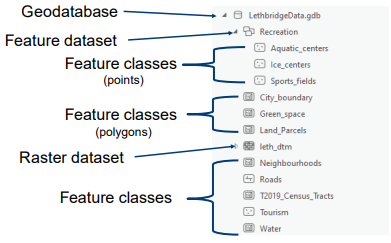 |
front 167 Catalog | back 167  allows you to view, create, and manage items in your project |
front 168 7 file types and their uses | back 168 • .cpg – Characters used to display text |
front 169 Layer Package | back 169 • Shares just one layer |
front 170 Map Package | back 170 • Shares an entire map |
front 171 Project Package | back 171 • Share the entire project |
front 172 Web Layer | back 172 • Shares data layers in a map as web layers |
front 173 Web Map | back 173 • Shares an entire map and creates a web map |
front 174 Discrete View (Discrete object view) | back 174 Representing the world with a series of separate objects. • Points: A simple set of coordinates |
front 175 Continuous View (Continuous field view) | back 175 Viewing the world as items that vary across the Earth’s surface as constant fields |
front 176 Continuous view (Raster data model) | back 176 Spatial model that uses an array of equally sized cells arranged in rows and columns |
front 177 Naming Restrictions for a raster data model | back 177 • Maximum of 13 characters |
front 178 pro's of Vector data | back 178 • No generalization |
front 179 Con's of Vector data | back 179 • The location of each vertex is stored explicitly |
front 180 Pro's of Raster data | back 180 • The location of each cell is implied by its location in the
grid |
front 181 Con's of Raster data | back 181 • Cell size can result in block images |
front 182 Attribute | back 182 Non-spatial data associated with a spatial location. Attributes are stored in an attribute table. |
front 183 The amount of attributes a piece of vector data can have attached to one location | back 183 Many can be assigned (Numerous) |
front 184 Joins | back 184 a method of linking two (or more) attribute tables |
front 185 Relates | back 185 • Defines a relationship between two or more tables but does not
attach or move data |
front 186 Spatial Join | back 186 Used when layers do not have a common attribute field |
front 187 Spatial Join (one-to-one) | back 187 A Join Operation that summarizes the joining information with each feature in the target layer |
front 188 Spatial Join (one-to-many) | back 188 A Join Operation where If multiple join features overlay the target feature, the output will contain multiple copies of the target feature. |
front 189 Selections | back 189 •Interactive selection |
front 190 Database Query | back 190 Computer language with defined syntax used for accessing data from databases |
front 191 Language used by Database Query's | back 191 Structured Query Language (SQL) |
front 192 Format of an SQL statement | back 192 <Field_Name><Operator><Value or String> • Text variables must be in ‘ ‘ |
front 193 Compound Query | back 193 A query used to make selections based on multiple criteria. |
front 194 selects the intersection between multiple criteria | back 194 AND |
front 195 selects everything that meets both criteria. Can be referred to as a union | back 195 OR |
front 196 selects what meets the first criteria but not the second criteria. This can be referred to as negation | back 196 NOT |
front 197 selects all features that only meet the first and second criteria. This can be referred to as exclusive | back 197 XOR |
front 198 Spatial Query | back 198 Selecting features or information based on a spatial relationship |
front 199 Intersect | back 199 Selects features in the input layer that completely or partially overlap the selecting features |
front 200 Within a Distance | back 200 • Creates a search area from the selecting feature |
front 201 Within | back 201 Selects input features that are located completely or partially
within the selecting |
front 202 Completely Within | back 202 •Selects the input feature if it does not share a boundary with the
selecting feature. |
front 203 Contains | back 203 •Selects the input feature that has the selecting feature within
it. |
front 204 Completely Contains | back 204 • The selecting feature must be completely within the input
feature |
front 205 Boundary Touches | back 205 •Selects the input if it touches the boundary of the selecting
feature |
front 206 Copy Feature | back 206 • Copies but does not save the new shapefile |
front 207 Export Feature | back 207 • Converts a shapefile to a new shapefile based on the
selection |
front 208 Digitizing | back 208 Process of creating points, lines, or polygons which represent features from a map or image. Errors can propagate during digitizing |
front 209 needed for Heads down Digitizing | back 209 Obsolete method of digitizing • Digitizing tablet |
front 210 needed for Heads up Digitizing | back 210 Newer method of digitizing •On-screen |
front 211 Heads down Digitizing | back 211 • Named based on the position of the user's head while
digitizing |
front 212 Heads up Digitizing | back 212 • Digitizing features on a computer screen |
front 213 Digitizing method that needs at least 4 control points | back 213 Heads Down Digitizing needs these 4 things |
front 214 How would I create a feature class? | back 214 • Right-click on your database |
front 215 Point Mode | back 215 The user identifies the points to be captured by intentionally pressing a button |
front 216 Stream Mode | back 216 Points are captured at set time intervals. (about 10 points/second) |
front 217 Sliver Polygon | back 217 occur when digitized polygons overlay each other or gaps exist
between the boundaries |
front 218 Process of Digitization (5 steps) | back 218 1. Create a new shapefile or select a shapefile to edit |
front 219 Georeferencing | back 219 The process of aligning an unreferenced dataset to one that has a spatial reference system. |
front 220 Often not Georeferenced | back 220 Satellite, aerial images, and CAD files |
front 221 Does not have a georeferencing system | back 221 Scanned maps |
front 222 Data needed for Georeferencing | back 222 • Unreferenced data |
front 223 Control Points | back 223 Locations that are identifiable and have known coordinates. Used to 'tie' unreferenced data to a dataset with real-world coordinates. |
front 224 4 Good control points | back 224 • Road intersections |
front 225 4 Bad control points | back 225 • Tops of buildings |
front 226 6 steps of the georeferencing process | back 226 1. Compare datasets with known and unknown coordinates |
front 227 What does GCP stand for | back 227 Ground Control Point |
front 228 The min number of GCPs for a zero-order-shift | back 228 Requires 1 |
front 229 Zero Order Shift | back 229 shifts the map, no change in scale or rotation |
front 230 First order affine | back 230 can shift, scale, and rotate a map |
front 231 The min number of GCPs for a first order affine | back 231 requires 3 |
front 232 Four common transformations using GCPs and the minimum amount of GCPs they need | back 232 • 1 for a zero-order shift (shifts the map, no change in scale or
rotation) |
front 233 Residual Error (Georeferencing) | back 233 • Calculated when a transformation is applied |
front 234 The Residual | back 234 The difference between the user-defined (observed) point and the
modelled |
front 235 Root Mean Square Error (RMSE) | back 235 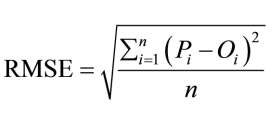 the square root of the mean value of all the squared errors (residuals) |
front 236 The minimum GCPs that are needed to calculate the RMSE | back 236 Minimum of 4 |
front 237 The amount of Residual Error is heavily influenced by this factor. | back 237 The quality of GCPs |
front 238 How does a poorly selected GCP affect RMSE | back 238 Causes a higher derived RMSE value |
front 239 Forward Residual | back 239 Shows the error in the same units as the data frame |
front 240 Inverse Residual | back 240 Shows you the error in pixel units |
front 241 Forward-Inverse Residual | back 241 Measure of overall accuracy measured by pixels |
front 242 Resampling | back 242 • During transformation, an empty cell matrix is computed |
front 243 Three common methods of Resampling | back 243 • Nearest neighbor |
front 244 Nearest Neighbor | back 244 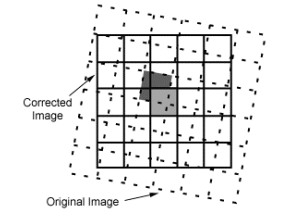 • Does not alter original values |
front 245 Two disadvantages of Nearest Neighbor | back 245 • Some values may be duplicated or lost |
front 246 Bilinear Interpolation | back 246 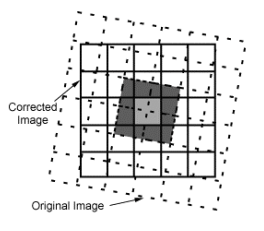 • Weighted average of four pixels in the original grid nearest the
new pixel |
front 247 Cubic Convolution | back 247 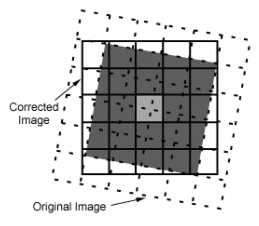 • Calculates a distance-weighted average of 16 pixels from the
original grid that surrounds the new output pixel. |
front 248 Which Resampling methods are not suited for use with discrete data? | back 248 Bilinear Interpolation and Cubic Convolution |
front 249 What is an advantage of using Bilinear interpolation and Cubic Convolution | back 249 They produce sharper image quality and are preferred for remote-sensing data |
front 250 Spatial analysis | back 250 Describes how features are spatially related to one another |
front 251 Constraints (spatial analysis) | back 251 Selections and queries to identify features that meet certain criteria |
front 252 Proximity (spatial analysis) | back 252 How close one feature is to another feature |
front 253 Networks (spatial analysis) | back 253 • What is the shortest route to a location? |
front 254 Clustering (spatial analysis) | back 254 Are nearby features similar to one another? |
front 255 Thiessen Polygons | back 255 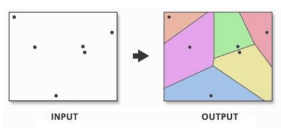 a map that shows the area around a point that is closer to that point than any other point |
front 256 5 step process for making a Thiessen polygon | back 256 1. Point data |
front 257 Buffers | back 257 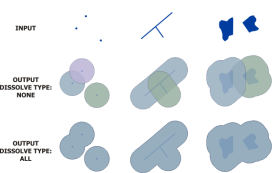 • A spatial proximity built around a point, line, or polygon • Buffer uses Euclidean distance |
front 258 Network Analyst | back 258 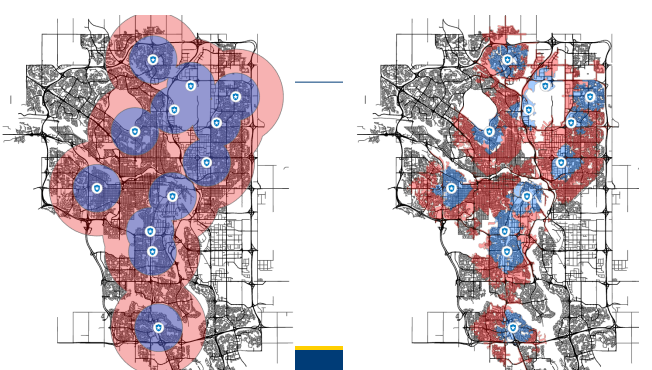 • Measured Manhattan Distance |
front 259 Manhattan Distance | back 259 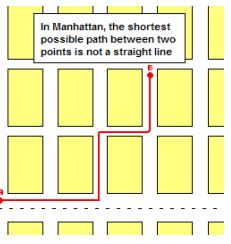 • Distance between two points on a grid |
front 260 Near | back 260 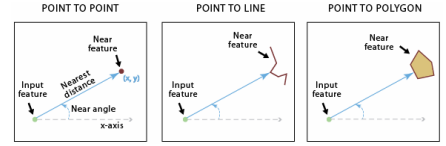 • Near features can be points, lines, or polygons • The Near Tool will add a new attribute field called “near
distance” |
front 261 Kernel Density (KDE) | back 261 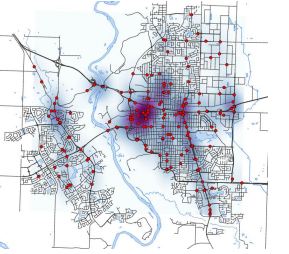 •Kernel Density (KDE) calculates the density of point features around
each output raster cell |
front 262 Feature types that can be used in KDE | back 262 Point and Line Features |
front 263 Possible uses of KDE | back 263 House density, crime reports, roads, wildlife habitat, etc |
front 264 What does a KDE 'window' do? | back 264 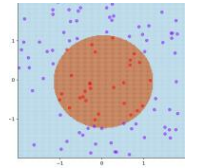 Counts the number of points within it to determine the density. |
front 265 What can fill a Raster Cell | back 265 Integers, Real Numbers, or Null (NODATA) |
front 266 Vertical Datum | back 266 baseline used for measuring elevation |
front 267 Represents elevation on a topographic map | back 267 contour lines |
front 268 For topographic maps to be scanned to create and apply digital elevations, two things are required of the topographic map. | back 268 It must be Georeferenced and Digitized |
front 269 Photogrammetry | back 269 Stereo pairs used to calculate elevation manually or digitally |
front 270 Light Detection and Ranging (LiDAR) | back 270 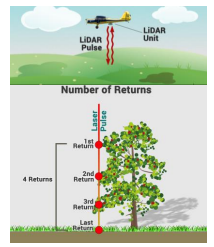 •Emits a laser pulse to the Earth’s surface and measures the
return |
front 271 Radio Detection and Ranging (Radar) | back 271 Emits a radio wave to measure the Earth's surface |
front 272 Digital Elevation Model (DEM) | back 272 Representation of the surface of the Earth • Bare Earth model |
front 273 Triangulated Irregular Network (TIN) | back 273 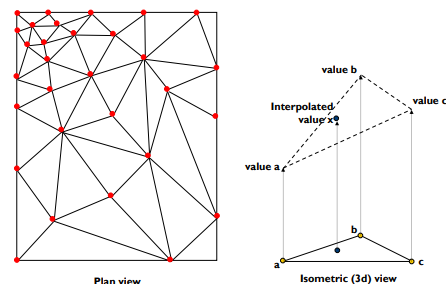 • Vector-based approach to creating Digital Elevation
Models |
front 274 Advantages of TIN | back 274 • Accepts randomly sampled data |
front 275 Advantages of DEM | back 275 • Accepts data directly from a matrix of cells |
front 276 Disadvantages of TIN | back 276 • Data intense and longer processing time |
front 277 Disadvantages of DEM | back 277 • Must be resampled if irregular data is used |
front 278 Digital Surface Model (DSM) | back 278 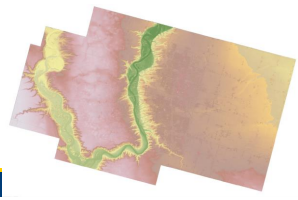 • A measurements of ground elevation heights as well as the objects
on the ground. |
front 279 Watershed Analysis | back 279 • DEMS are used to delineate watersheds, calculate flow accumulation
and direction. |
front 280 Predictive Surfaces | back 280 Using measurements at a set of locations to predict values in locations that were not measured. |
front 281 Predictive Surfaces can be used to do two things | back 281 Interpolate and/or Extrapolate |
front 282 Interpolate | back 282 is the process of predicting values between known points |
front 283 Extrapolate | back 283 predicts values outside of known sample points |
front 284 Exact interpolation method | back 284 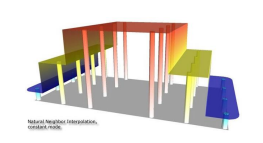 Creates a surface that passes through all known points |
front 285 Approximate interpolation method | back 285 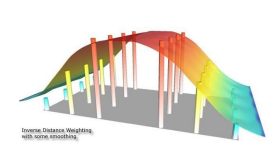 Creates a surface that may vary from known values |
front 286 Local Interpolation method | back 286 Use spatially defined data subsets |
front 287 Global Interpolation method | back 287 Use all data in the study area |
front 288 4 possible predictive surfaces | back 288 • Inverse Distance Weighting (IDW) |
front 289 Inverse Distance Weighting (IDW) | back 289 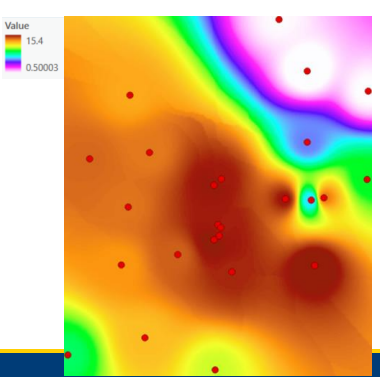 • IDW predicts values using a weighted combination of sample
points |
front 290 Tobler's First law of Geography | back 290 “Everything is related to everything else, but near things are more
related than |
front 291 Benefits of using IDW | back 291 • There is a known influence of proximity |
front 292 Limitations of IDW | back 292 • Doesn’t handle sharp changes in data |
front 293 Fixed Search Radius (IDW) | back 293 Fixed search radius will remain constant unless a minimum number of points is not met |
front 294 Variable Search Radius (IDW) | back 294 Variable search radius will change to include a minimum number of sample points |
front 295 Barriers (IDW) | back 295 • Breaklines that limit the search for samples |
front 296 Natural Neighbor | back 296 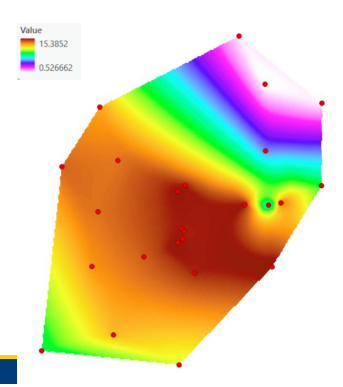 • Finds the nearest input samples to a grid cell and weights them
based on proportionate areas overlapping the grid cell area. |
front 297 Benefits of Natural Neighbor | back 297 • Ideal for irregularly spaced data |
front 298 Limitations of Natural Neighbor | back 298 • Does not represent peaks, ridges or valleys |
front 299 Spline | back 299 • Minimizes the curvature to create a smooth surface • Users can control the number of points used to calculate each
interpolated cell value. |
front 300 Benefits of Spline | back 300 • Estimates beyond the max & min |
front 301 Limitations of Spline | back 301 • Can miss sharp changes (cliffs, fault lines…) |
front 302 Regularized Spline | back 302 allows users to adjust the weight parameter to smooth the
surface. |
front 303 Tension Spline | back 303 allows users to adjust the weight parameter to stiffen the
surface. |
front 304 Overlay | back 304 A layer that reveals more information about an underlying map |
front 305 Trend | back 305 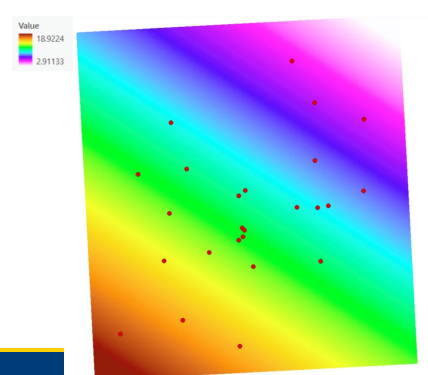 • Global polynomial interpolation method used to capture coarse-scale
patterns |
front 306 First order polynomial | back 306 linear |
front 307 Second order polynomial | back 307 one bend |
front 308 Third order polynomial | back 308 two bends |
front 309 Benefits of Trend | back 309 • Large-scale pattern recognition |
front 310 Limitations of Trend | back 310 • Oversimplifies data |